Linggo, Hulyo 31, 2011
.... syAh ng pRaktIsZz....
...., gRabe syah ng praktisz para sa soc.stud... pagktpos ng paulitul8 nah practizz ENJOY nman.... pagkatapos nun pntng MINI STOP... halah nagulo nmin mini stop.... nagpa picture pah sa guard.... hahah... nxt tym ul8... gud eve everyone... share lng....

Sabado, Hulyo 30, 2011
Types of Computers
Types of Computers
1.) Analog Computers: These are almost extinct today. These are different from a digital computer because an analog computer can perform several mathematical operations simultaneously. It uses continuous variables for mathematical operations and utilizes mechanical or electrical energy.

2.) Hybrid Computers: These computers are a combination of both digital and analog computers. In this type of computers, the digital segments perform process control by conversion of analog signals to digital ones.

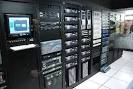
3.) Mainframe Computers: Large organizations use mainframes for highly critical applications such as bulk data processing and ERP. Most of the mainframe computers have the capacities to host multiple operating systems and operate as a number of virtual machines and can thus substitute for several small servers.
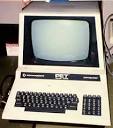
4.) Microcomputers: A computer with a microprocessor and its central processing unit is known as a microcomputer. They do not occupy space as much as mainframes. When supplemented with a keyboard and a mouse, microcomputers can be called as personal computers. A monitor, a keyboard and other similar input output devices, computer memory in the form of RAM and a power supply unit come packaged in a microcomputer. These computers can fit on desks or tables and serve as the best choices for single-user tasks.
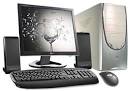
5.) Desktops: A desktop is intended to be used on a single location. The spare parts of a desktop computer are readily available at relative lower costs. Power consumption is not as critical as that in laptops. Desktops are widely popular for daily use in workplaces and households.
6.) Laptops: Similar in operation to desktops, laptop computers are miniaturized and optimized for mobile use. Laptops run on a single battery or an external adapter that charges the computer batteries. They are enabled with an inbuilt keyboard, touch pad acting as a mouse and a liquid crystal display. Its portability and capacity to operate on battery power have served as a boon for mobile users.

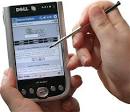
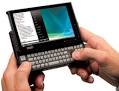
7.) Personal Digital Assistants (PDAs): It is a handheld computer and popularly known as a palmtop. It has a touch screen and a memory card for storage of data. PDAs can also be effectively used as portable audio players, web browsers and smart phones. Most of them can access the Internet by means of Bluetooth or Wi-Fi communication.
8.) Minicomputers: In terms of size and processing capacity, minicomputers lie in between mainframes and microcomputers. Minicomputers are also called mid-range systems or workstations. The term began to be popularly used in the 1960s to refer to relatively smaller third generation computers. They took up the space that would be needed for a refrigerator or two and used transistor and core memory technologies. The 12-bit PDP-8 minicomputer of the Digital Equipment Corporation was the first successful minicomputer.
2.) Hybrid Computers: These computers are a combination of both digital and analog computers. In this type of computers, the digital segments perform process control by conversion of analog signals to digital ones.
3.) Mainframe Computers: Large organizations use mainframes for highly critical applications such as bulk data processing and ERP. Most of the mainframe computers have the capacities to host multiple operating systems and operate as a number of virtual machines and can thus substitute for several small servers.
4.) Microcomputers: A computer with a microprocessor and its central processing unit is known as a microcomputer. They do not occupy space as much as mainframes. When supplemented with a keyboard and a mouse, microcomputers can be called as personal computers. A monitor, a keyboard and other similar input output devices, computer memory in the form of RAM and a power supply unit come packaged in a microcomputer. These computers can fit on desks or tables and serve as the best choices for single-user tasks.
5.) Desktops: A desktop is intended to be used on a single location. The spare parts of a desktop computer are readily available at relative lower costs. Power consumption is not as critical as that in laptops. Desktops are widely popular for daily use in workplaces and households.
6.) Laptops: Similar in operation to desktops, laptop computers are miniaturized and optimized for mobile use. Laptops run on a single battery or an external adapter that charges the computer batteries. They are enabled with an inbuilt keyboard, touch pad acting as a mouse and a liquid crystal display. Its portability and capacity to operate on battery power have served as a boon for mobile users.
7.) Personal Digital Assistants (PDAs): It is a handheld computer and popularly known as a palmtop. It has a touch screen and a memory card for storage of data. PDAs can also be effectively used as portable audio players, web browsers and smart phones. Most of them can access the Internet by means of Bluetooth or Wi-Fi communication.
8.) Minicomputers: In terms of size and processing capacity, minicomputers lie in between mainframes and microcomputers. Minicomputers are also called mid-range systems or workstations. The term began to be popularly used in the 1960s to refer to relatively smaller third generation computers. They took up the space that would be needed for a refrigerator or two and used transistor and core memory technologies. The 12-bit PDP-8 minicomputer of the Digital Equipment Corporation was the first successful minicomputer.
=> MTAP day <=
..., hayyyy.... kkpagod nman araw nah 2... maagah kah ggcng prang my cLass din ea... sama pah ng panahon nki sabaysabay pah c ulan.... NUH B YAN....? peruh sayah din ng araw nah to khit pahpanuh.... nxt Saturday ul8....
Biyernes, Hulyo 29, 2011
..., aNuh b Yan...
...., grabe ang lakas lakas ng ulan... nagkandabasabasah acouh dun... parah kng bagong liguh dun.... bwct na bagyo yan....d marunung mkisama... :P
... sYah nG dAy cOuh...
..., best ever friday couh nah 2 sa ngayon.... (07/29/11)...... heheh....
....sHaRe lNg.... :D
....sHaRe lNg.... :D
Huwebes, Hulyo 28, 2011
nyT pEopLe......
..., gug nyt 2 oL of you.... sLeEp nah puh acouh.... bka puh kc my pxok na ul8 2morrow ea.... bYe.... sweat dreamsz 2 oL.... :)
.....aaaAAAhhhHHH.......
,gUd eVe..., everyone.... uxtah puh araw nui...., acouh kkpagud.... naglibut kc kmeh ea.... heheh... share lng....
Miyerkules, Hulyo 27, 2011
pRoUt to Be....
UST: We accept WISE students only.
FEU: We accept GREAT students only.
DLSU: We accept COMPETITIVE students only.
ADMU: We accept INTELLIGENT students only.
UP: We accept GENIUS students only.
RSHS: WE DON'T NEED TO ACCEPT WISE, GREAT, COMPETITIVE, INTELLIGENT, GENIUS STUDENTS. WE CREATE THEM!
GAWIN MO 'TONG STATUS MO KUNG PROUD KANG TAGA REGIONAL SCIENCE HIGH SCHOOL
FEU: We accept GREAT students only.
DLSU: We accept COMPETITIVE students only.
ADMU: We accept INTELLIGENT students only.
UP: We accept GENIUS students only.
RSHS: WE DON'T NEED TO ACCEPT WISE, GREAT, COMPETITIVE, INTELLIGENT, GENIUS STUDENTS. WE CREATE THEM!
GAWIN MO 'TONG STATUS MO KUNG PROUD KANG TAGA REGIONAL SCIENCE HIGH SCHOOL
" 3 Idiots "
Things further escalate when the three friends, who are already drunk, break into Virus' house at night to allow Rancho to propose to Pia, and then urinate on a door inside the compound before running away. The next day, Virus threatens to expel Raju unless he squeals on Rancho. Not wanting to betray his friend or let down his family, Raju jumps out of the third floor window and ends up in a coma. Following his recovery, Raju takes an unexpected approach for an interview for a corporate job whilst Farhan decides to pursue his love of photography. The two friends succeed with their tasks and this further enfuriates Virus, causing him to come up with a plan that will jeopardize Raju's job. During this process, Pia overhears this and decides to help Rancho and Farhan by providing them with the keys to her father's office. However, Virus catches them and expels them on the spot. After that Pia angrily confronts him, revealing that his son, Pia's brother, committed suicide when he could not get into ICE, like Virus wanted him to. At the same time Viru's pregnant elder daughter Mona (Mona Singh) goes into labour. A heavy storm cuts all power and traffic, and Pia is in self-imposed exile because of her revealing of her brother's actions. She instructs Rancho to deliver the baby in the college common room via VOIP. After the baby is apparently stillborn, Rancho resuscitates the baby. Virus reconciles with Rancho and his friends, and allows the trio to stay for their final exams.
Their story is framed as intermittent flashbacks from the present day, ten years after Chatur promised to become more successful than Rancho. Having lost contact with Rancho, who disappeared during the graduation party and went into seclusion, Raju and Farhan begin a journey to find him. They are joined by Chatur, now a wealthy and successful businessman, who joins them, brazenly confident that he has surpassed Rancho and also looking to seal a deal with a famous scientist and prospective business associate named Phunsukh Wangdu. When they find Rancho's house in Shimla, they find a completely different Rancho (Jaaved Jaffrey). From him they come to know that their friend was a destitute servant boy "Chhote" who loved learning, while he, the real Rancho, disliked study. The family agreed to let the servant boy study in Rancho's place instead of labouring. In return, the real Rancho would pocket the qualifications and after graduating, the servant boy will cease all contact. The real Rancho reveals that Chhote is now a school-teacher in Ladakh.
Raju and Farhan find Pia and arrive in Rancho’s school. Pia and the fake Rancho rekindle their love, while Chatur mocks Rancho for becoming a school teacher. He asks Rancho to sign on a "Declaration of defeat" document. When Rancho's friends ask for his real name is, he reveals that he is actually Phunsukh Wangdu himself. Chatur finds out about this and is horrified; he accepts his defeat and pleads his case with Phunsukh to establish the business relationship he was after.
hay nkuh.....
nAg kMli acouh.... sbi kuh dun sa last poSt cOuh kGbe...fOr surE my cLaSs nAh 2morrow...bUtI nLNg... wLaH.... heheh
wLh uL8 cLaSs.....
yIppEe.... nO cLaSsEs again.... FB nahnman magdamag nituh.... aGa nlng nkah online.... heheh... sarap ulit mtulog nituh... ahhhhhhh..... zzzzZZZzzzz.... :P
zzzZZZzzz....
,gud nyt everyone... sleep nah puh acouh... gbe nah ea... for sure kc my class 2morow.... Signal no.1 nlng kc ea... nyt people... xD... God Bless everyone...
hhhhh... wlng pxok...
syah nahnman... wlng pxok... signal no.2... fb nahnman... halos lhat ng nka online I-Emerald.... hahah... srap din mtulog...RAINY dAy kc ea....
Lunes, Hulyo 25, 2011
Kinds of Computer
Hi everyone, I had been busy the past couple of days and did not have the time to write articles. However, with the weekend approaching, I will be taking this opportunity to write a good many articles. Something over the past few days inspired me to write about computers.
Now computers are a passion of mine and I thought it would be a good idea to write about them. Also, being in the I.T. industry for a great many years, I feel obliged to write to my best extent on computers.
Now, I am beginning a series of articles here similar to the financial series of articles that I would be posting up soon.
Now, let us define computers: A computer is the most basic understanding is an electronic device that processes data, converting it into information that is useful to people.
Even at this very moment, you are using a computer to read this article, and the history of computers dates way back to the 17th century in what was known as Generation zero. If you are wondering, we are currently in the fifth generation with artificial intelligence, quantum computation, nanotechnology, etc;
Now, I will write on the history of computing which would be interesting to some people, and fascinating to others in another article.
In this article, I am going to talk more about the different computers that are present in the current world:
- · Desktop computers
- · Workstations
- · Notebook computers
- · Tablet computers
- · Handheld computers
- · Smart phones
- · Supercomputers
- · Mainframe computers
- · Minicomputers
Desktop computers
Different type of computers
The most common computer used in today’s world are the desktop computers which were specially built for personal use be it at home or work. These computers are everywhere, from your office, to your house, schools, laboratories and even public places like a public library, universities and so on. There is a great chance that you have accessed this website using a desktop computer.
Today’s computers are brilliant at task management than many years ago. Today’s desktop computers can be used to communicate, produce music, edit photographs and videos, play sophisticated games, and much more.
As the name implies, a desktop computer is a full size computer that is too big to be carried around. Nowadays, most desktop computers are equipped with two primary hardware solutions – the monitor and a casing inside which is stored the central processing unit (CPU), the motherboard, the graphic card, storage devices, buses, power supply and so on.
A desktop computer is also equipped with a keyboard and mouse which are connected to their appropriate ports at the back of the casing.
Workstations
A workstation is a specialized, single user computer that typically has more power and features than a standard desktop computer. These machines are more popular in the lab of scientists, engineers or even animators who require a system with greater than average speed and power to perform sophisticated calculations, rendering, or high level tasks.
Workstations often have larger and higher resolution monitors, and accelerated graphics. In relation to this, I would give you an example : - such as the Quadro series of graphic cards. They are commonly used in workstations.
This higher specifications allow for advanced architectural engineering design, modeling ,animation and even video editing.
Notebook computers
Notebook computers as the name implies is approximately the size of an 8.5-11 inch notebook and can easily fit inside a briefcase. Since most people including yourself would set this device on your lap and use it conveniently in eateries, cafes, at the work place, in education institutions and so on, hence the name laptop.
Notebook computers can operate on alternating current or special batteries. These special device also weighs less than 8 pounds and some even lesser than three pounds.
Using a laptop is as simple as opening a book. Think of it as opening your notebook. Similarly, when a laptop is opened, the upper lid will present a screen or lcd monitor. At the bottom is the keyboard and beneath the keyboard is the specialty hardware such as the motherboard, cpu, hard-disk and so on.
The portability of laptops is one of the most major reasons for the increased use of laptops nowadays. They are the mobile computers that can be carried anywhere and used conveniently.
Tablet PC
Different type of computers
Tablet PC’s are some of the more newer developments in portable, full featured computers. Tablet PC’s just like a notebook offers the full range of functionalities except that they are lighter and accepts input from pen/pointers known as a stylus.
Most interactions are done directly via the screen of the computer and some tablet PC’s also allow for input via the user’s voice. As you know, even phones these days accept voice commands to get things done.
Tablet PC’s can run specialized versions of standard programs and can be connected to a network or to the internet. Certain and in most new models now – a keyboard and a mouse can be attached as well.
Tablet PC’s are used mainly in the graphic design field where drawing on the tablet PC’s can be translated into digital drawings and be edited by various graphic editing tools.
Handheld PC’s
Different type of computers
Handheld personal computers are computing devices small enough to fit in your hand. A popular type of handheld computer is the personal digital assistant (PDA).
A PDA is no larger than a small appointment book and is normally used for special applications such as taking notes, displaying telephone numbers and addresses and keeping track of dates or agendas.
Many PDA’s can be connected to computers to exchange data. Most PDAs come with a pen (stylus) that allows for handwriting recognition and some even have tiny built-in keyboards or microphones for voice input.
A wireless connection (Wi-Fi) can be used to access the internet with a PDA. PDAs in the later part of this century were converted into phones, cameras, music players and GPS.
The demands for PDA phones have been in the increase and of late have been mostly replaced by smart-phones that are equipped with much functionality similar to a computer.
Smart phones
Different type of computers
Smart phones are handheld devices or mobile phones that have a processing unit attached to act as a handheld computer cum phone.
These phones offer advanced features not typically found in normal cellular phones. These phones come with additional features beyond the traditional SMS and calling features. Smart phones these days allow you to surf the internet using your phone, take pictures, videos, listen to music, conduct presentations, record voice, play games, e-mail, and many other additional features.
Smart phones are also equipped with an operating system just like your desktop or laptop computers are equipped with an operating system, Windows, Linux, etc;
Supercomputers
Different type of computers
Supercomputers are the most fastest, and expensive modern computer systems. They are mostly used for intense processing and forecasting such as forecasting the weather, or super high resolution graphics such as ray traced images.
Government processes such as immigration clearances, and all other high level functionalities are handled by a supercomputer.
Supercomputers are also extensively used in the military to manage and calculate or even analyze full range of information from coordinates to traffic control and even launching systems.
Today, the world’s fastest supercomputer was developed by IBM – the IBM Roadrunner which runs on 1.026 – 1.105 Pflops or petaflops and is placed in the Los Alamos National Laboratory, New Mexico USA taking up a space of 6000 square feet.
Mainframe computers
Different type of computers
Mainframe computers are used in large organizations such as insurance companies and banks, where many people frequently need to use the same data. In a traditional mainframe environment, each user accesses the mainframe’s resources through a terminal (network terminal).
There are two kinds of terminal, one is a dumb terminal which does not process or store data, just basic I/O – input output and the intelligent terminal which can perform processing operations but these terminals normally do not have any storage.
Mainframes are large and powerful systems to handle the processing of thousands of users at any one time. Most large organizations implement mainframes due to their flexibilities in which department computers can be allocated a certain functionality that is related to the department in response to all programs.
For instance, an airline company which wishes to sell tickets online through the internet will require to connect their current website interface to a mainframe system.
You as the user would then connect to the website or the mainframe system to key in your ticket purchase.
Minicomputers
Different type of computers
Minicomputers are small sized computers which have their capabilities between the range of a personal desktop computer and a mainframe.
Minicomputers were replaced by the microcomputers which took over the reign of those mighty minicomputers due to their greater processing power.
Today, mini and micro computers are replaced by much more powerful systems as you can see from above.
History of Computer
The first substantial computer was the giant ENIAC machine by John W. Mauchly and J. Presper Eckert at the University of Pennsylvania. ENIAC (Electrical Numerical Integrator and Calculator) used a word of 10 decimal digits instead of binary ones like previous automated calculators/computers. ENIAC was also the first machine to use more than 2,000 vacuum tubes, using nearly 18,000 vacuum tubes. Storage of all those vacuum tubes and the machinery required to keep the cool took up over 167 square meters (1800 square feet) of floor space. Nonetheless, it had punched-card input and output and arithmetically had 1 multiplier, 1 divider-square rooter, and 20 adders employing decimal "ring counters," which served as adders and also as quick-access (0.0002 seconds) read-write register storage.
The executable instructions composing a program were embodied in the separate units of ENIAC, which were plugged together to form a route through the machine for the flow of computations. These connections had to be redone for each different problem, together with presetting function tables and switches. This "wire-your-own" instruction technique was inconvenient, and only with some license could ENIAC be considered programmable; it was, however, efficient in handling the particular programs for which it had been designed. ENIAC is generally acknowledged to be the first successful high-speed electronic digital computer (EDC) and was productively used from 1946 to 1955. A controversy developed in 1971, however, over the patentability of ENIAC's basic digital concepts, the claim being made that another U.S. physicist, John V. Atanasoff, had already used the same ideas in a simpler vacuum-tube device he built in the 1930s while at Iowa State College. In 1973, the court found in favor of the company using Atanasoff claim and Atanasoff received the acclaim he rightly deserved.
The executable instructions composing a program were embodied in the separate units of ENIAC, which were plugged together to form a route through the machine for the flow of computations. These connections had to be redone for each different problem, together with presetting function tables and switches. This "wire-your-own" instruction technique was inconvenient, and only with some license could ENIAC be considered programmable; it was, however, efficient in handling the particular programs for which it had been designed. ENIAC is generally acknowledged to be the first successful high-speed electronic digital computer (EDC) and was productively used from 1946 to 1955. A controversy developed in 1971, however, over the patentability of ENIAC's basic digital concepts, the claim being made that another U.S. physicist, John V. Atanasoff, had already used the same ideas in a simpler vacuum-tube device he built in the 1930s while at Iowa State College. In 1973, the court found in favor of the company using Atanasoff claim and Atanasoff received the acclaim he rightly deserved.
| Computer History Year/Enter | Computer History Inventors/Inventions | Computer History Description of Event |
| Konrad Zuse - Z1 Computer | First freely programmable computer. | |
| John Atanasoff & Clifford Berry ABC Computer | Who was first in the computing biz is not always as easy as ABC. | |
| Howard Aiken & Grace Hopper Harvard Mark I Computer | The Harvard Mark 1 computer. | |
| John Presper Eckert & John W. Mauchly ENIAC 1 Computer | 20,000 vacuum tubes later... | |
| Frederic Williams & Tom Kilburn Manchester Baby Computer & The Williams Tube | Baby and the Williams Tube turn on the memories. | |
| John Bardeen, Walter Brattain & Wiliam Shockley The Transistor | No, a transistor is not a computer, but this invention greatly affected the history of computers. | |
| John Presper Eckert & John W. Mauchly UNIVAC Computer | First commercial computer & able to pick presidential winners. | |
| International Business Machines IBM 701 EDPM Computer | IBM enters into 'The History of Computers'. | |
| John Backus & IBM FORTRAN Computer Programming Language | The first successful high level programming language. | |
| Stanford Research Institute, Bank of America, and General Electric ERMA and MICR | The first bank industry computer - also MICR (magnetic ink character recognition) for reading checks. | |
| Jack Kilby & Robert Noyce The Integrated Circuit | Otherwise known as 'The Chip' | |
| Steve Russell & MIT Spacewar Computer Game | The first computer game invented. | |
| Douglas Engelbart Computer Mouse & Windows | Nicknamed the mouse because the tail came out the end. | |
| ARPAnet | The original Internet. | |
| Intel 1103 Computer Memory | The world's first available dynamic RAM chip. | |
| Faggin, Hoff & Mazor Intel 4004 Computer Microprocessor | The first microprocessor. | |
| Alan Shugart &IBM The "Floppy" Disk | Nicknamed the "Floppy" for its flexibility. | |
| Robert Metcalfe & Xerox The Ethernet Computer Networking | Networking. | |
| Scelbi & Mark-8 Altair & IBM 5100 Computers | The first consumer computers. | |
| Apple I, II & TRS-80 & Commodore Pet Computers | More first consumer computers. | |
| Dan Bricklin & Bob Frankston VisiCalc Spreadsheet Software | Any product that pays for itself in two weeks is a surefire winner. | |
| Seymour Rubenstein & Rob Barnaby WordStar Software | Word Processors. | |
| IBM The IBM PC - Home Computer | From an "Acorn" grows a personal computer revolution | |
| Microsoft MS-DOS Computer Operating System | From "Quick And Dirty" comes the operating system of the century. | |
| Apple Lisa Computer | The first home computer with a GUI, graphical user interface. | |
| Apple Macintosh Computer | The more affordable home computer with a GUI. | |
| Microsoft Windows | Microsoft begins the friendly war with Apple. | |
Miyerkules, Hulyo 20, 2011
Lunes, Hulyo 18, 2011
Answer:

Florence Danon Gayda (born October 16, 1931), better known as Rosa Rosal, is a FAMAS award-winning Filipino film actress dubbed as the "originalfemme fatale of Philippine cinema".[1][2] She is also known as the founder of the Philippine National Red Cross. For her humanitarian activities, she received the 1999 Ramon Magsaysay Award for Public Service,[3] an award widely considered as Asia's Nobel Prize.[4][5][6] She is the mother of TV host Toni Rose Gayda.Rosal was born Florence Danon in Manila. Her mother hailed from Santa Rita, Pampanga, while her father was of French and Egyptian descent.[2] Her half-brother, Don Danon, once acted as a stand-in for the Hollywood actor Rudolph Valentino.[7]
 During the Japanese occupation of the Philippines, Rosal worked as a newsreader in a Japanese-run radio station.[2] Shortly after the end of the war, Rosal worked part-time at the San Lazaro Hospital. One night, she was passing by a film shooting as she was walking home, and she was spotted by the film's producer, Luis Nolasco.[2] She was offered a film contract by Nolasco, who headed his own outfit, the Nolasco Brothers Studio.[1]
[edit]
Damian Domingo
 Damian Domingo
AKA Damian Gabor Domingo 
- 1st Filipino to paint his face, the first self-portrait in the Philippines
- Founder of the Academia de Dibujo y Pintura, the first school of drawing in the Philippines (1821)
- "Father of Filipino Painting"
ALIAS
"The First Great Filipino Painter"
DATE OF BIRTH
1796
BIRTHPLACE
Tondo, Manila, Philippines
WIFE: Lucia Casas
CHILDREN: Celedonia, Severo, Anastacio, Feliciana, Agapita, Mariano, Jose, and Nicolasa
YEAR OF DEATH
1834
USEFUL LINKSThe Spanish Colonial Tradition in Philippine Visual Arts
Damian Domingo (1796-1834)
Ayala Museum Exhibition - Damian Domingo: The First Great Filipino Painter
Painting
John Gokongwei Jr. One of the irrefutable and strongest arguments in favor of increasing long-term investment in the Philippine economy regardless of the country's seemingly disconcerting political turbulence - is the bullish multi-billion-peso new investment of Asian's legendary rags-to-riches taipan John L. Gokongwei Jr.Last Oct. 19 at a private dinner with Anvil Business Club members, he encouraged 180 topnotch young Filipino-Chinese entrepreneurs from diverse industries to aggressively continue investing and help make the Philippine economy globally competitive.One reason Gokongwei is a billionaire and most of us entrepreneurs still aren't is because he is bold and can see beyond the noisy political tumult. He perceives money-making opportunities where the faint-hearted or the pessimists only see danger.His daughter Lisa Gokongwei-Cheng of Summit Media first met her future husband Berck Cheng at the Anvil Business Club, of which he was one of the 17 original co-founders.His son Lance Gokongwei's best friend and compadre Asia Brewery boss Michael G. Tan is also co-founder and past Chairman and President of Anvil. Gokongwei's business partner in the Robinsons Handyman and Do It best hardware chains is Anvil's past Chairman and President Wilfred "Willy" Co.Anvil co-founder and two term past president Jeffrey Ng of the South Forbes Golf City project said Gokongwei's rags-to-riches success is an inspiration for all young people.Anvil's first president and Philippine Business Conference chairman George Siy said: "We look up to Gokongwei not only for his prowess in money-making, but for his lifelong discipline, strategic thinking and management excellence."
 Founder of Pink box: Rosal J. Rolio Birthday: November 23,1945
i just love designing~
I just simply loved creating and designing, . . . , thanks to my dad, who got me into a proper training school . . .haaa!looking back 5 years ago~
I have been creating my own pieces of accessories about 4 years back . . . trying to create pieces using Polymer Clays. . . Since then i got myself hooked on creating unique pieces of my accessories.what sparkles me into online~It has been in me, for the love of acquiring new opportunities, and learning new ideas. That took a twist when i was browsing some local magazines, and this caught my attention 'Earn money while you are asleep - Selling Online'. I started researching on this, and found Ebay, and later on Lelong. They were my motivations, i think! ... ha! Trying my luck into selling in Ebay, competing with so many sellers, i managed to sell my first 2 pieces to a very nice buyer ...
 Damian Domingo
AKA Damian Gabor Domingo
- 1st Filipino to paint his face, the first self-portrait in the Philippines
- Founder of the Academia de Dibujo y Pintura, the first school of drawing in the Philippines (1821)
- "Father of Filipino Painting"
ALIAS
"The First Great Filipino Painter"
DATE OF BIRTH
1796
BIRTHPLACE
Tondo, Manila, Philippines
"The First Great Filipino Painter"
DATE OF BIRTH
1796
BIRTHPLACE
Tondo, Manila, Philippines
WIFE: Lucia Casas
CHILDREN: Celedonia, Severo, Anastacio, Feliciana, Agapita, Mariano, Jose, and Nicolasa
YEAR OF DEATH
1834
CHILDREN: Celedonia, Severo, Anastacio, Feliciana, Agapita, Mariano, Jose, and Nicolasa
YEAR OF DEATH
1834
USEFUL LINKS
The Spanish Colonial Tradition in Philippine Visual ArtsDamian Domingo (1796-1834)
Ayala Museum Exhibition - Damian Domingo: The First Great Filipino Painter
Painting
John Gokongwei Jr.

One of the irrefutable and strongest arguments in favor of increasing long-term investment in the Philippine economy regardless of the country's seemingly disconcerting political turbulence - is the bullish multi-billion-peso new investment of Asian's legendary rags-to-riches taipan John L. Gokongwei Jr.
Last Oct. 19 at a private dinner with Anvil Business Club members, he encouraged 180 topnotch young Filipino-Chinese entrepreneurs from diverse industries to aggressively continue investing and help make the Philippine economy globally competitive.
One reason Gokongwei is a billionaire and most of us entrepreneurs still aren't is because he is bold and can see beyond the noisy political tumult. He perceives money-making opportunities where the faint-hearted or the pessimists only see danger.
His daughter Lisa Gokongwei-Cheng of Summit Media first met her future husband Berck Cheng at the Anvil Business Club, of which he was one of the 17 original co-founders.
His son Lance Gokongwei's best friend and compadre Asia Brewery boss Michael G. Tan is also co-founder and past Chairman and President of Anvil. Gokongwei's business partner in the Robinsons Handyman and Do It best hardware chains is Anvil's past Chairman and President Wilfred "Willy" Co.
Anvil co-founder and two term past president Jeffrey Ng of the South Forbes Golf City project said Gokongwei's rags-to-riches success is an inspiration for all young people.
Anvil's first president and Philippine Business Conference chairman George Siy said: "We look up to Gokongwei not only for his prowess in money-making, but for his lifelong discipline, strategic thinking and management excellence."
Founder of Pink box: Rosal J. Rolio
Birthday: November 23,1945
i just love designing~
I just simply loved creating and designing, . . . , thanks to my dad, who got me into a proper training school . . .haaa!
I just simply loved creating and designing, . . . , thanks to my dad, who got me into a proper training school . . .haaa!
looking back 5 years ago~
I have been creating my own pieces of accessories about 4 years back . . . trying to create pieces using Polymer Clays. . . Since then i got myself hooked on creating unique pieces of my accessories.
I have been creating my own pieces of accessories about 4 years back . . . trying to create pieces using Polymer Clays. . . Since then i got myself hooked on creating unique pieces of my accessories.
what sparkles me into online~It has been in me, for the love of acquiring new opportunities, and learning new ideas. That took a twist when i was browsing some local magazines, and this caught my attention 'Earn money while you are asleep - Selling Online'. I started researching on this, and found Ebay, and later on Lelong. They were my motivations, i think! ... ha! Trying my luck into selling in Ebay, competing with so many sellers, i managed to sell my first 2 pieces to a very nice buyer ...
Mag-subscribe sa:
Mga Komento (Atom)