, grabeh andyan nah cia...
,palapit na cia
,napakahirap
,panu ba yan
,oh know...
,kinakabahan na me...
,anuh ggwin kuh
,nan dayn talagah
,2 days un ea...
,C pEriOdiCaL nan dyan nah...
hahah... wlang magawa... ahahah xD
Sabado, Nobyembre 5, 2011

Martes, Nobyembre 1, 2011
...all saiNts dAy...
...,hayyy...,kkpagod nman... ang dming pipz... parang reunion din ah...hahah..
shAring mOde <~~ xD =D
Biyernes, Oktubre 28, 2011
...,Holoween Party...
...,grabeh ang sayah ng HP. enjoy....,:)
kaya lng din din masyadong complete..., wlah kc kmng adviser ea... :(
.., kina career tlgah nila...grabeh mga mukha nila kakatak cute... ahahah xD
kaya lng din din masyadong complete..., wlah kc kmng adviser ea... :(
.., kina career tlgah nila...grabeh mga mukha nila kakatak cute... ahahah xD
Lunes, Oktubre 24, 2011
...medyu lungkot ng day kuh...
...,hayyy nakuh people... ang lngkot kuh ngayon... d uh syah nkita :(.... hayyayay... hahah... xhare lng.. :(
Linggo, Oktubre 23, 2011
..., biLis ah...
..., gud eve evryone...
...,npancn nui b... khapon saturday ngaun sunday nah tpos tomorrow monday nah ulit .... grabeh... ang bilis ng DAY...
..., ilang weeks nlng CHRISTMAS nah... heheh... :)
...,npancn nui b... khapon saturday ngaun sunday nah tpos tomorrow monday nah ulit .... grabeh... ang bilis ng DAY...
..., ilang weeks nlng CHRISTMAS nah... heheh... :)
Sabado, Oktubre 22, 2011
TROPA...?
..., bkit gnun.... anuh b ang definition sa nyu ng word nah 'TROPA"....
.... dba ang ibig sbhin ng salitang magkaka "TROPA" ay lahat sila alam ang sikreto ng bawat isa... hindi ung masyado clng malihim sa isa't isa... =D
.... ea bkit gnun ung iba... my "TROPA" nga clah... anung silbi nun kung nagtataguan cla ng sikreto sa isa't isa...dbah...?
....sApUl... ahahah xD LoL... :D
.... dba ang ibig sbhin ng salitang magkaka "TROPA" ay lahat sila alam ang sikreto ng bawat isa... hindi ung masyado clng malihim sa isa't isa... =D
.... ea bkit gnun ung iba... my "TROPA" nga clah... anung silbi nun kung nagtataguan cla ng sikreto sa isa't isa...dbah...?
....sApUl... ahahah xD LoL... :D
..., cLasS nmin... (saturday)
...,hayyy nakuh... kung alam nui lng... dpat d nah kmi pnpsok ea... wlah nmng ggwin ea... heheh...
nkipag kwen2han lng akuh knina ea... share ng story sa life... heheh.. :) ang saya palah pag my mga tunay na " KAIBIGAN" imba.. hahah...
nkipag kwen2han lng akuh knina ea... share ng story sa life... heheh.. :) ang saya palah pag my mga tunay na " KAIBIGAN" imba.. hahah...
...,ahmp...
...,good evening everyone... how's your day,,,? =D
..ang saya saya nagun...hahah... lakas ng trip nmin.. heheh =D xD...
..update lng..heheh.... =D
..ang saya saya nagun...hahah... lakas ng trip nmin.. heheh =D xD...
..update lng..heheh.... =D
Biyernes, Oktubre 21, 2011
...g'nyt olL...
...,gud nyt nah sa enyung lhat... my pasok ngah pla bkas (saturday) d kc me sanay ng my pasok bukas ea... kung sana sa LIBOT yan ay kaaga kung maggcng kht d nah kuh gcngin...ahahah LoL...jk lng =D nyt xenui lhat... =D
...saturDay....cLasS????
...., si bagyo kc ea... nwalan 2loy kmi ng pasok ng ilang days...
yan 2loy my cLasS kme tomorrow... konti lng 2loy ung weekend nmin... NUH B YAN...?
...,peruh pwede nah din un... hahah xD
yan 2loy my cLasS kme tomorrow... konti lng 2loy ung weekend nmin... NUH B YAN...?
...,peruh pwede nah din un... hahah xD
...ang trip ng trOpa...
..., gud evvveeening everyone.... my day is fabulous... hahah xD... lol....
= alam mo ung feeling na ang sakitsakit na ng tiyan mo...dahil pinipigil mong tumawa... naluluha ka na rin sa kakatawa... grabeh...ang lakas ng trip nmin kanina...hahah... =D ...share lng... :)
= alam mo ung feeling na ang sakitsakit na ng tiyan mo...dahil pinipigil mong tumawa... naluluha ka na rin sa kakatawa... grabeh...ang lakas ng trip nmin kanina...hahah... =D ...share lng... :)
Huwebes, Oktubre 20, 2011
....ang sayah sayah....
...,hellow everyone...
=> ang sarap ng feeling kpag my relative ka na sikat na sikat sa school na pinag-aaralan mo... hahah...ang gwapo ni KUA IVAN... hahah.... nagkita na rin kmi sa wakas... hahah.. =D 10/20/11
=> ang sarap ng feeling kpag my relative ka na sikat na sikat sa school na pinag-aaralan mo... hahah...ang gwapo ni KUA IVAN... hahah.... nagkita na rin kmi sa wakas... hahah.. =D 10/20/11
Miyerkules, Oktubre 19, 2011
sayang...
..,ang saya ng day nah to... day nah my tensyon...kakakabah kninah... sayang tlgah 2 number nlng ung ttwgin BIBINGO na sana akuh ea...kainis... pero ok nah din...experience din yun...ahahah xD... =D
Martes, Oktubre 18, 2011
...syah ng day kuh...
...,halah... grabeh...hndi kuh maexplain ung syah nah nraramdaman kuh ngaun... hahah... paglabas kuh ng rum cia agad nkita ko grabeh.... kinawayan p.a nyah kuh..hahah =D share lng...! :)
Sabado, Oktubre 15, 2011
... nag-ibah nah...
...,hayyy nakuh... ang saya saya kuh knina... pero bkit ngaun nag-ibah nah... napka lungkot nah... :(
Biyernes, Oktubre 14, 2011
ang sayah...
...,grabe ang saya ng day nah to... bonding with my classmates "UNFORGETABLE"... HAHAH..
Huwebes, Oktubre 13, 2011
...bad3p...
.,hayyy nkuh... anuh anuh nah nman pnggggwa nla sa buhay nila...nkktwa lng clah..ahahah =D bad3p 2ng day nah to...arrrgghh. nOt feeling well... :(
Miyerkules, Oktubre 12, 2011
...gud nynytss...
...everyone gudnyts nah..my class pah tomorrow ea... =D
= the sky is crying....
..... gudnyt peOple... =D
= the sky is crying....
..... gudnyt peOple... =D
...ang delubyo...xD
...,halalala...! andyan nah ung delubyong exam...ang dami ng exam...tpos ang hirap pah...ang masama dyan sabay sabay pah...anuh b yan d muh alam kung anu ang uunahin...hayyyyy...
....hayyy sa wakas....
...,nakuh sa wakas nag karoon nah din ng net.... ang hirap pag wlng net...nakakaasar talagah...arrgggh...
Huwebes, Setyembre 29, 2011
...3 days...
...hahah... ang saya saya... wlah nah nmang psok....for 3 days...
kya lng lungkot din dhil hndi kuh din syah nkikita..., :'(
kya lng lungkot din dhil hndi kuh din syah nkikita..., :'(
Martes, Setyembre 27, 2011
...ulit nah nman...
...,hahahah....nkktwa nah nman tong day nah to... my electricity nah...masusulit ko nah ang wlng pasok..hahah...wlah nah nmang pasok yehey....xD =D
...,signing off...
...,evvry one gud nyt nah...,bka kc my pasok nah tomorrow ea..., gud nyt evryone im signing off..., babussshhh... =D
...electricity...
....wla ngang psok...d ko nman ma enjoy... npaka lakas nah bagyo...nwalan tuloy ng electricity.... ang hirap pag wlng electricity...
...hirap..
...,grabe d pah maayos ung sayaw nmin sa earth sci...ang dmi kc activity ngaun ea..., d pah din ako nkaka gwa ng report sa soc stud..,anuh b yan...? ang hirap grabe...
...,bagyo bagyo...,
...,alam mo bah nakakaabala ka sa pag-aaral ng mga studyante..., nakakagulo ka sa buhay ng iba..., mdmi kanang nsira nah buhay...kaya please lng tigilan mo nah kme.... bagyo bagyo pki usap... tantanan mo nah kami...
...., xD... =D
...., xD... =D
..party party...?
..,wlng psok...nkktuwa nman... pero d kuh din nman nkita si _______ ...,kya d masyadong complete day ko...,hahah ok lng un....,heheh share lng xD...=D
Lunes, Setyembre 26, 2011
..,nakakamiss...
...,ngaun nlng ulit nkpag open ng blog... nkakamiss nman..., after ilng week ngaun nlng ulit mag popost...., heheh xD
Huwebes, Setyembre 22, 2011
pRelim on EaRth Sci
...,hayyy! slamat at ntapos nah din ang PreLim sa earth sci...,ang hrap magreview...,.
bk8 kc cnbi one day before the test...,tambak 2loy ng lessons....,
..,pero ok nah un tpos nah ea...,
bk8 kc cnbi one day before the test...,tambak 2loy ng lessons....,
..,pero ok nah un tpos nah ea...,
Sabado, Setyembre 17, 2011
Martes, Setyembre 13, 2011
bad3p..,
....hayyyyy...
anuh b itong araw nah to...
kakabad3p nman...,
klah kc kng cnuh cyah..
klah nyah plgng cyah...,
gus2 nyah sa knya nah lahat...
pati bah nman kaibigan nyah ipinagpalit nyah...
para lng sa atensyon nah nkukuha nyah..,
glng xah iba..,
anuh b itong araw nah to...
kakabad3p nman...,
klah kc kng cnuh cyah..
klah nyah plgng cyah...,
gus2 nyah sa knya nah lahat...
pati bah nman kaibigan nyah ipinagpalit nyah...
para lng sa atensyon nah nkukuha nyah..,
glng xah iba..,
Lunes, Setyembre 12, 2011
unang araw ng pxok after the inTrams..,
...,hayyyyy...
...,tpus nah rin ang intrams...,
...,syah..,dming nka close nah ibng year...,
...,tpOs nah ngah INTRAMS..., aral nah nman ul8..,
...,tpus nah rin ang intrams...,
...,syah..,dming nka close nah ibng year...,
...,tpOs nah ngah INTRAMS..., aral nah nman ul8..,
Linggo, Setyembre 11, 2011
late pOst..,
..,ang syah ng day couh khapon..,
...,ibang syah tlgah...,
..,one of the best day q..,
..,maulet xanah..,
...,share lng nman...,
...,ibang syah tlgah...,
..,one of the best day q..,
..,maulet xanah..,
...,share lng nman...,
Martes, Setyembre 6, 2011
..,a HAPPY day..,
...,gud eve evryone..., uxtah..,lpit nah ul8 ng Intrams..,2 days 2 go nlng..., syah ngah plah ng araw q ngaun.., kkpgod peruh sulit nman..., 2mrw nman ul8... gud luck ul8 xah lhat ng team..,
Linggo, Setyembre 4, 2011
.,.update lng
..,gud eve minma.., lpit nah ng intrams...,ilng days nlng...,gud luck xah lahat ng team..,pero..., GO BLUE TEAM.., :-D..,
Huwebes, Setyembre 1, 2011
BILIS..,
...,grabe ang bilis ng araw ah.., lpit nah nman ang SATURDAY.., tpos weekend nah nman..., ang bilisblis tlgah..., :-D
Martes, Agosto 30, 2011
Holiday...,
..,sarap ng holiday couh.., bondng with my couzinz UNFORGETABLE.., xnah 2wing holiday my memorable moments..., :-D
Huwebes, Agosto 25, 2011
Extensions
Writer
Application Document - .sdw
Master Document - .sgl
Calc
.sdc
Impress
.sdd
Draw
.sda
Writer
Application Document - .sdw
Master Document - .sgl
Calc
.sdc
Impress
.sdd
Draw
.sda
Base
.sdb
Math
.smf
.sdb
Math
.smf
Writer: a decent word processor. Some people say it's better than MS Word.
Calc: the OpenOffice spreadsheet program and a replacement for MS Excel.
Impress: a presentation program that replaces MS PowerPoint.
Draw: a two- and three-dimensional drawing program that many people rate more highly than the same functions within MS Office.
COUNTERPART
Microsoft | Open Office |
Excel | Calc |
Power Point | Impress |
Paint | Draw |
Access | Base |
Math | Smart Art |
Word | Writer |
Martes, Agosto 23, 2011
Lunes, Agosto 22, 2011
Huwebes, Agosto 11, 2011
Stage Play
...,hay naku...., ang hirap pumila bago mkapsok....,pero kaht gnun sulit nman...,ang ganda ng stage play..., nice work....
Miyerkules, Agosto 10, 2011
....,halaaaaa.....
...,grabe ang lapitlpit nah ng perio....kay langan nah ng puspusang pag rereview....., GUD LUCK xAh Lhat ng mag eexam..... :-D
Martes, Agosto 9, 2011
Assignment No.7
- 1ANTI-VIRUS SOFTWARE - Installing a reputable anti-virus program will help rid your computer of unknown viruses, trojans, worms, etc., which slow it down immensely. There are tons of programs out there to choose from. I'd suggest kaspersky Anti-Virus. They have some of the most highly rated software on the web. There are also free anti-virus programs available, but they are not as effective as ones you pay for. I've provided links to both below (under resources).
- 2ANTI-SPYWARE SOFTWARE - Spyware, much like viruses, slow down your PC tremendously. Most spyware is installed without you knowing when you're browsing the internet or opening up random emails. To eliminate them, I would suggest downloading Spy-Bot Search and Destroy. It's absolutely free and it's one of the best pieces of anti-spyware/adware software available. I've provided a link below.
- 3DEFRAGMENTING YOUR HARD DRIVES - Fragmenting of the hard drives occur over time whenever you delete files, move them around or even when your computer looses power unexpectedly. Defragmenting regularly and often helps rearrange or your file, optimizing them for faster access. The windows operating system has this built in feature and is easily accessible from the start menu. Or you could download the free version of Auslogic's defragmenter, which I actually think is better.
- 4DEFRAGMENT YOUR REGISTRY - Your registry, much like your hard drives, needs to be defragmented regularly. Auslogic also provided a program that performs this function, the link is below.
- 5EXTERNAL CLEANING - Over time, the inside of your computer can gather massive amounts of dust. This decreases the airflow and increases the amount of heat inside your case, which can damage expensive components. Purchase a couple of Air Dusters and remove the dust regularly.
- 6KEEP YOUR PC UP TO DATE - Regularly update your PC with the latest drivers and software upgrades. Doing this will improve the efficiency of many of the programs running and improve the overall performance.
- 7START UP PROGRAMS - If your computer takes a long time to start up, you may want to disable some useless programs that start when you log on.
- 8BACKGROUND PROGRAMS - Every programs that runs on your PC uses a small amount of memory. If you have to many programs running in the background at once, your computer can take a lot longer to respond and seem slow. Disabling many of these useless processes will free up memory and speed up your computers responsiveness.
- 9TWEAKS - There are many other tweaks that you could do also. Search the internet for other ways to improve the performance of your PC. There are also many articles on eHow that can help you too.
...,Grabe nAh aRaw....
...,hay nakuh...,tambak xah test..., buti nlng nausog ung perio kng hndi.....HALAH patay nah.... dme rereviewhin....,,
Good Working Habits
- Tap on keys and mouse gently.
- Avoid long, interrupted periods of typing.
- avoid staring at the monitor for long periods.
- Avoid long, interrupted periods of typing.
- avoid staring at the monitor for long periods.
Proper Workstation Design
- Position in a well-ventilated, comfortable room.
- Use an adjustable working chair.
- Place the monitor 16 to 24 inches.
- Use extendable legs of the keyboard.
- Place the mouse where it is easily accesible by your dominant hand.
- Use a document folder to minimize vertical head movements.
- Use an adjustable working chair.
- Place the monitor 16 to 24 inches.
- Use extendable legs of the keyboard.
- Place the mouse where it is easily accesible by your dominant hand.
- Use a document folder to minimize vertical head movements.
How to Take Care Computers
1. All the cables and connectors must
be tied together to keep them away from walkways to avoid accidents.
2. Computers need a good working temperature to work properly. They need to be placed in a cool, dry place.
be tied together to keep them away from walkways to avoid accidents.
2. Computers need a good working temperature to work properly. They need to be placed in a cool, dry place.
3. Refrain from eating in front of the computer.
4. Always use an AVR to regulate electricity.
5. Do nut bump or drop the computer peripherals or components as any damage may cause them to malfunction.
6. Avoid clutter around your computer.
7. Always scan for computer viruses to avoid the cause of software malfunctions.
4. Always use an AVR to regulate electricity.
5. Do nut bump or drop the computer peripherals or components as any damage may cause them to malfunction.
6. Avoid clutter around your computer.
7. Always scan for computer viruses to avoid the cause of software malfunctions.
Martes, Agosto 2, 2011
=> NutRi jIngle dAy <=
..., halah nkuh puh.... grabe... ang gagaling ng mga nkalaban nmin.... lalakas pah ng boses... kakata cute.... pero kh8 papanuh ENJOY nman... at leastttt.... nah experience... hahah...
Lunes, Agosto 1, 2011
day nah ng contest... syah...
... hay nkuh... slamat at ntapus na din ang SABAYNG PAGBIGKAS nmin.... syah nman ea.... kht pahpanuh nagbungah din ang pinaghirapan nmin...hahah syah... share lng nman... xD
Linggo, Hulyo 31, 2011
.... syAh ng pRaktIsZz....
...., gRabe syah ng praktisz para sa soc.stud... pagktpos ng paulitul8 nah practizz ENJOY nman.... pagkatapos nun pntng MINI STOP... halah nagulo nmin mini stop.... nagpa picture pah sa guard.... hahah... nxt tym ul8... gud eve everyone... share lng....
Sabado, Hulyo 30, 2011
Types of Computers
Types of Computers
1.) Analog Computers: These are almost extinct today. These are different from a digital computer because an analog computer can perform several mathematical operations simultaneously. It uses continuous variables for mathematical operations and utilizes mechanical or electrical energy.

2.) Hybrid Computers: These computers are a combination of both digital and analog computers. In this type of computers, the digital segments perform process control by conversion of analog signals to digital ones.

3.) Mainframe Computers: Large organizations use mainframes for highly critical applications such as bulk data processing and ERP. Most of the mainframe computers have the capacities to host multiple operating systems and operate as a number of virtual machines and can thus substitute for several small servers.
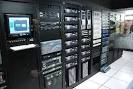
4.) Microcomputers: A computer with a microprocessor and its central processing unit is known as a microcomputer. They do not occupy space as much as mainframes. When supplemented with a keyboard and a mouse, microcomputers can be called as personal computers. A monitor, a keyboard and other similar input output devices, computer memory in the form of RAM and a power supply unit come packaged in a microcomputer. These computers can fit on desks or tables and serve as the best choices for single-user tasks.
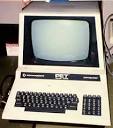
5.) Desktops: A desktop is intended to be used on a single location. The spare parts of a desktop computer are readily available at relative lower costs. Power consumption is not as critical as that in laptops. Desktops are widely popular for daily use in workplaces and households.
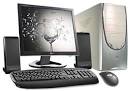
6.) Laptops: Similar in operation to desktops, laptop computers are miniaturized and optimized for mobile use. Laptops run on a single battery or an external adapter that charges the computer batteries. They are enabled with an inbuilt keyboard, touch pad acting as a mouse and a liquid crystal display. Its portability and capacity to operate on battery power have served as a boon for mobile users.

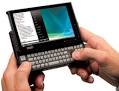
7.) Personal Digital Assistants (PDAs): It is a handheld computer and popularly known as a palmtop. It has a touch screen and a memory card for storage of data. PDAs can also be effectively used as portable audio players, web browsers and smart phones. Most of them can access the Internet by means of Bluetooth or Wi-Fi communication.
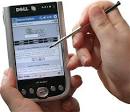
8.) Minicomputers: In terms of size and processing capacity, minicomputers lie in between mainframes and microcomputers. Minicomputers are also called mid-range systems or workstations. The term began to be popularly used in the 1960s to refer to relatively smaller third generation computers. They took up the space that would be needed for a refrigerator or two and used transistor and core memory technologies. The 12-bit PDP-8 minicomputer of the Digital Equipment Corporation was the first successful minicomputer.
2.) Hybrid Computers: These computers are a combination of both digital and analog computers. In this type of computers, the digital segments perform process control by conversion of analog signals to digital ones.
3.) Mainframe Computers: Large organizations use mainframes for highly critical applications such as bulk data processing and ERP. Most of the mainframe computers have the capacities to host multiple operating systems and operate as a number of virtual machines and can thus substitute for several small servers.
4.) Microcomputers: A computer with a microprocessor and its central processing unit is known as a microcomputer. They do not occupy space as much as mainframes. When supplemented with a keyboard and a mouse, microcomputers can be called as personal computers. A monitor, a keyboard and other similar input output devices, computer memory in the form of RAM and a power supply unit come packaged in a microcomputer. These computers can fit on desks or tables and serve as the best choices for single-user tasks.
5.) Desktops: A desktop is intended to be used on a single location. The spare parts of a desktop computer are readily available at relative lower costs. Power consumption is not as critical as that in laptops. Desktops are widely popular for daily use in workplaces and households.
6.) Laptops: Similar in operation to desktops, laptop computers are miniaturized and optimized for mobile use. Laptops run on a single battery or an external adapter that charges the computer batteries. They are enabled with an inbuilt keyboard, touch pad acting as a mouse and a liquid crystal display. Its portability and capacity to operate on battery power have served as a boon for mobile users.
7.) Personal Digital Assistants (PDAs): It is a handheld computer and popularly known as a palmtop. It has a touch screen and a memory card for storage of data. PDAs can also be effectively used as portable audio players, web browsers and smart phones. Most of them can access the Internet by means of Bluetooth or Wi-Fi communication.
8.) Minicomputers: In terms of size and processing capacity, minicomputers lie in between mainframes and microcomputers. Minicomputers are also called mid-range systems or workstations. The term began to be popularly used in the 1960s to refer to relatively smaller third generation computers. They took up the space that would be needed for a refrigerator or two and used transistor and core memory technologies. The 12-bit PDP-8 minicomputer of the Digital Equipment Corporation was the first successful minicomputer.
=> MTAP day <=
..., hayyyy.... kkpagod nman araw nah 2... maagah kah ggcng prang my cLass din ea... sama pah ng panahon nki sabaysabay pah c ulan.... NUH B YAN....? peruh sayah din ng araw nah to khit pahpanuh.... nxt Saturday ul8....
Biyernes, Hulyo 29, 2011
..., aNuh b Yan...
...., grabe ang lakas lakas ng ulan... nagkandabasabasah acouh dun... parah kng bagong liguh dun.... bwct na bagyo yan....d marunung mkisama... :P
... sYah nG dAy cOuh...
..., best ever friday couh nah 2 sa ngayon.... (07/29/11)...... heheh....
....sHaRe lNg.... :D
....sHaRe lNg.... :D
Huwebes, Hulyo 28, 2011
nyT pEopLe......
..., gug nyt 2 oL of you.... sLeEp nah puh acouh.... bka puh kc my pxok na ul8 2morrow ea.... bYe.... sweat dreamsz 2 oL.... :)
.....aaaAAAhhhHHH.......
,gUd eVe..., everyone.... uxtah puh araw nui...., acouh kkpagud.... naglibut kc kmeh ea.... heheh... share lng....
Miyerkules, Hulyo 27, 2011
pRoUt to Be....
UST: We accept WISE students only.
FEU: We accept GREAT students only.
DLSU: We accept COMPETITIVE students only.
ADMU: We accept INTELLIGENT students only.
UP: We accept GENIUS students only.
RSHS: WE DON'T NEED TO ACCEPT WISE, GREAT, COMPETITIVE, INTELLIGENT, GENIUS STUDENTS. WE CREATE THEM!
GAWIN MO 'TONG STATUS MO KUNG PROUD KANG TAGA REGIONAL SCIENCE HIGH SCHOOL
FEU: We accept GREAT students only.
DLSU: We accept COMPETITIVE students only.
ADMU: We accept INTELLIGENT students only.
UP: We accept GENIUS students only.
RSHS: WE DON'T NEED TO ACCEPT WISE, GREAT, COMPETITIVE, INTELLIGENT, GENIUS STUDENTS. WE CREATE THEM!
GAWIN MO 'TONG STATUS MO KUNG PROUD KANG TAGA REGIONAL SCIENCE HIGH SCHOOL
" 3 Idiots "
Things further escalate when the three friends, who are already drunk, break into Virus' house at night to allow Rancho to propose to Pia, and then urinate on a door inside the compound before running away. The next day, Virus threatens to expel Raju unless he squeals on Rancho. Not wanting to betray his friend or let down his family, Raju jumps out of the third floor window and ends up in a coma. Following his recovery, Raju takes an unexpected approach for an interview for a corporate job whilst Farhan decides to pursue his love of photography. The two friends succeed with their tasks and this further enfuriates Virus, causing him to come up with a plan that will jeopardize Raju's job. During this process, Pia overhears this and decides to help Rancho and Farhan by providing them with the keys to her father's office. However, Virus catches them and expels them on the spot. After that Pia angrily confronts him, revealing that his son, Pia's brother, committed suicide when he could not get into ICE, like Virus wanted him to. At the same time Viru's pregnant elder daughter Mona (Mona Singh) goes into labour. A heavy storm cuts all power and traffic, and Pia is in self-imposed exile because of her revealing of her brother's actions. She instructs Rancho to deliver the baby in the college common room via VOIP. After the baby is apparently stillborn, Rancho resuscitates the baby. Virus reconciles with Rancho and his friends, and allows the trio to stay for their final exams.
Their story is framed as intermittent flashbacks from the present day, ten years after Chatur promised to become more successful than Rancho. Having lost contact with Rancho, who disappeared during the graduation party and went into seclusion, Raju and Farhan begin a journey to find him. They are joined by Chatur, now a wealthy and successful businessman, who joins them, brazenly confident that he has surpassed Rancho and also looking to seal a deal with a famous scientist and prospective business associate named Phunsukh Wangdu. When they find Rancho's house in Shimla, they find a completely different Rancho (Jaaved Jaffrey). From him they come to know that their friend was a destitute servant boy "Chhote" who loved learning, while he, the real Rancho, disliked study. The family agreed to let the servant boy study in Rancho's place instead of labouring. In return, the real Rancho would pocket the qualifications and after graduating, the servant boy will cease all contact. The real Rancho reveals that Chhote is now a school-teacher in Ladakh.
Raju and Farhan find Pia and arrive in Rancho’s school. Pia and the fake Rancho rekindle their love, while Chatur mocks Rancho for becoming a school teacher. He asks Rancho to sign on a "Declaration of defeat" document. When Rancho's friends ask for his real name is, he reveals that he is actually Phunsukh Wangdu himself. Chatur finds out about this and is horrified; he accepts his defeat and pleads his case with Phunsukh to establish the business relationship he was after.
hay nkuh.....
nAg kMli acouh.... sbi kuh dun sa last poSt cOuh kGbe...fOr surE my cLaSs nAh 2morrow...bUtI nLNg... wLaH.... heheh
wLh uL8 cLaSs.....
yIppEe.... nO cLaSsEs again.... FB nahnman magdamag nituh.... aGa nlng nkah online.... heheh... sarap ulit mtulog nituh... ahhhhhhh..... zzzzZZZzzzz.... :P
zzzZZZzzz....
,gud nyt everyone... sleep nah puh acouh... gbe nah ea... for sure kc my class 2morow.... Signal no.1 nlng kc ea... nyt people... xD... God Bless everyone...
hhhhh... wlng pxok...
syah nahnman... wlng pxok... signal no.2... fb nahnman... halos lhat ng nka online I-Emerald.... hahah... srap din mtulog...RAINY dAy kc ea....
Lunes, Hulyo 25, 2011
Kinds of Computer
Hi everyone, I had been busy the past couple of days and did not have the time to write articles. However, with the weekend approaching, I will be taking this opportunity to write a good many articles. Something over the past few days inspired me to write about computers.
Now computers are a passion of mine and I thought it would be a good idea to write about them. Also, being in the I.T. industry for a great many years, I feel obliged to write to my best extent on computers.
Now, I am beginning a series of articles here similar to the financial series of articles that I would be posting up soon.
Now, let us define computers: A computer is the most basic understanding is an electronic device that processes data, converting it into information that is useful to people.
Even at this very moment, you are using a computer to read this article, and the history of computers dates way back to the 17th century in what was known as Generation zero. If you are wondering, we are currently in the fifth generation with artificial intelligence, quantum computation, nanotechnology, etc;
Now, I will write on the history of computing which would be interesting to some people, and fascinating to others in another article.
In this article, I am going to talk more about the different computers that are present in the current world:
- · Desktop computers
- · Workstations
- · Notebook computers
- · Tablet computers
- · Handheld computers
- · Smart phones
- · Supercomputers
- · Mainframe computers
- · Minicomputers
Desktop computers
Different type of computers
The most common computer used in today’s world are the desktop computers which were specially built for personal use be it at home or work. These computers are everywhere, from your office, to your house, schools, laboratories and even public places like a public library, universities and so on. There is a great chance that you have accessed this website using a desktop computer.
Today’s computers are brilliant at task management than many years ago. Today’s desktop computers can be used to communicate, produce music, edit photographs and videos, play sophisticated games, and much more.
As the name implies, a desktop computer is a full size computer that is too big to be carried around. Nowadays, most desktop computers are equipped with two primary hardware solutions – the monitor and a casing inside which is stored the central processing unit (CPU), the motherboard, the graphic card, storage devices, buses, power supply and so on.
A desktop computer is also equipped with a keyboard and mouse which are connected to their appropriate ports at the back of the casing.
Workstations
A workstation is a specialized, single user computer that typically has more power and features than a standard desktop computer. These machines are more popular in the lab of scientists, engineers or even animators who require a system with greater than average speed and power to perform sophisticated calculations, rendering, or high level tasks.
Workstations often have larger and higher resolution monitors, and accelerated graphics. In relation to this, I would give you an example : - such as the Quadro series of graphic cards. They are commonly used in workstations.
This higher specifications allow for advanced architectural engineering design, modeling ,animation and even video editing.
Notebook computers
Notebook computers as the name implies is approximately the size of an 8.5-11 inch notebook and can easily fit inside a briefcase. Since most people including yourself would set this device on your lap and use it conveniently in eateries, cafes, at the work place, in education institutions and so on, hence the name laptop.
Notebook computers can operate on alternating current or special batteries. These special device also weighs less than 8 pounds and some even lesser than three pounds.
Using a laptop is as simple as opening a book. Think of it as opening your notebook. Similarly, when a laptop is opened, the upper lid will present a screen or lcd monitor. At the bottom is the keyboard and beneath the keyboard is the specialty hardware such as the motherboard, cpu, hard-disk and so on.
The portability of laptops is one of the most major reasons for the increased use of laptops nowadays. They are the mobile computers that can be carried anywhere and used conveniently.
Tablet PC
Different type of computers
Tablet PC’s are some of the more newer developments in portable, full featured computers. Tablet PC’s just like a notebook offers the full range of functionalities except that they are lighter and accepts input from pen/pointers known as a stylus.
Most interactions are done directly via the screen of the computer and some tablet PC’s also allow for input via the user’s voice. As you know, even phones these days accept voice commands to get things done.
Tablet PC’s can run specialized versions of standard programs and can be connected to a network or to the internet. Certain and in most new models now – a keyboard and a mouse can be attached as well.
Tablet PC’s are used mainly in the graphic design field where drawing on the tablet PC’s can be translated into digital drawings and be edited by various graphic editing tools.
Handheld PC’s
Different type of computers
Handheld personal computers are computing devices small enough to fit in your hand. A popular type of handheld computer is the personal digital assistant (PDA).
A PDA is no larger than a small appointment book and is normally used for special applications such as taking notes, displaying telephone numbers and addresses and keeping track of dates or agendas.
Many PDA’s can be connected to computers to exchange data. Most PDAs come with a pen (stylus) that allows for handwriting recognition and some even have tiny built-in keyboards or microphones for voice input.
A wireless connection (Wi-Fi) can be used to access the internet with a PDA. PDAs in the later part of this century were converted into phones, cameras, music players and GPS.
The demands for PDA phones have been in the increase and of late have been mostly replaced by smart-phones that are equipped with much functionality similar to a computer.
Smart phones
Different type of computers
Smart phones are handheld devices or mobile phones that have a processing unit attached to act as a handheld computer cum phone.
These phones offer advanced features not typically found in normal cellular phones. These phones come with additional features beyond the traditional SMS and calling features. Smart phones these days allow you to surf the internet using your phone, take pictures, videos, listen to music, conduct presentations, record voice, play games, e-mail, and many other additional features.
Smart phones are also equipped with an operating system just like your desktop or laptop computers are equipped with an operating system, Windows, Linux, etc;
Supercomputers
Different type of computers
Supercomputers are the most fastest, and expensive modern computer systems. They are mostly used for intense processing and forecasting such as forecasting the weather, or super high resolution graphics such as ray traced images.
Government processes such as immigration clearances, and all other high level functionalities are handled by a supercomputer.
Supercomputers are also extensively used in the military to manage and calculate or even analyze full range of information from coordinates to traffic control and even launching systems.
Today, the world’s fastest supercomputer was developed by IBM – the IBM Roadrunner which runs on 1.026 – 1.105 Pflops or petaflops and is placed in the Los Alamos National Laboratory, New Mexico USA taking up a space of 6000 square feet.
Mainframe computers
Different type of computers
Mainframe computers are used in large organizations such as insurance companies and banks, where many people frequently need to use the same data. In a traditional mainframe environment, each user accesses the mainframe’s resources through a terminal (network terminal).
There are two kinds of terminal, one is a dumb terminal which does not process or store data, just basic I/O – input output and the intelligent terminal which can perform processing operations but these terminals normally do not have any storage.
Mainframes are large and powerful systems to handle the processing of thousands of users at any one time. Most large organizations implement mainframes due to their flexibilities in which department computers can be allocated a certain functionality that is related to the department in response to all programs.
For instance, an airline company which wishes to sell tickets online through the internet will require to connect their current website interface to a mainframe system.
You as the user would then connect to the website or the mainframe system to key in your ticket purchase.
Minicomputers
Different type of computers
Minicomputers are small sized computers which have their capabilities between the range of a personal desktop computer and a mainframe.
Minicomputers were replaced by the microcomputers which took over the reign of those mighty minicomputers due to their greater processing power.
Today, mini and micro computers are replaced by much more powerful systems as you can see from above.
Mag-subscribe sa:
Mga Komento (Atom)